
Monitoring network equipment is usually a good way to be notified quickly about issues that could impact operations requiring network connectivity. One way to monitor equipment is using SNMP – Simple Network Management Protocol. “Simple” is a bit an oxymoron, because the underlying settings – just look at MIBs – are far from being simple. Using a proper tool, and after some efforts setting all it up, SNMP monitoring is effective and not intrusive for monitored devices. The devices themselves collect data, and report them to applications querying them.
DrayTek Vigor routers do support SNMP, although with some quirks in their data reporting. In this article will be shown how to enable SNMP monitoring on a Vigor 165, and how to collect and display data using Zabbix. We’ll also use snmpwalk command line utility to read raw SNMP data.
Note: SNMP does not return VDSL line characteristics data (HLog, QLN, SNR, bitloading). These data can be accessed using CLI commands via telnet/SSH. You can use my utility to automatically read and plot them.
Accessing SNMP data
First of all, we need to enable SNMP monitoring and the SNMP agent on the router itself. Go to System Maintenance > Management, enable the SNMP agent. Some other settings are required:
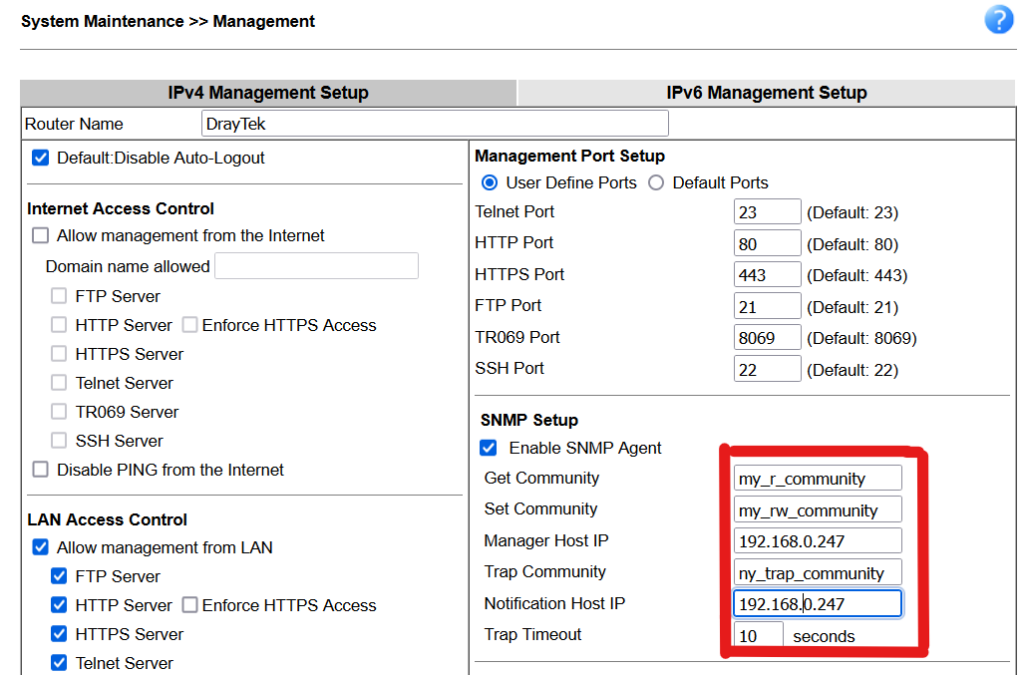
In this case only SMPv2c is supported. SNMPv3 uses stronger authentication/authorization methods, but is not supported here.
The SNMP “communities” are the “secrets” required to access a given device SNMP data. They are not very secure, of course, and the traffic is in clear, still use names not easy to guess (those above are just examples), and keep them reserved. Especially the “Set Community” which allows to change the device settings (if writable), non just read them.
The Manager Host IP is the IP of the remote device allowed to read data from the Vigor, and the Notification Host IP the device SNMP traps are sent to. While usually SNMP is a “pull” process, the remote monitoring device will query the Vigor for data, SNMP traps are “push” events the Vigor can send to the remote device if specific conditions occur. The SNMP agent uses the reserved port 161, while traps are sent to port 162.
Once we have enabled SNMP on the Vigor, we can use snmpwalk to read data from it (from a Linux machine, or WSL in Windows) to test it, for example:
snmpwalk -m all -v 2c -c <read_community> <router_host_or_address> > draytek.txt
The italicized strings needs to be replaced with your own (I have a working DNS setup that lets me refer to the router by name. Use the router IP otherwise). Use the “Get” community name for <read_community>.
If everything was set up correctly, draytek.txt will contain the output of the command, made of Object IDentifiers (OIDs), their data type and values, for example (interface names and speeds, each interface is numbered):
IF-MIB::ifDescr.1 = STRING: LAN
IF-MIB::ifDescr.4 = STRING: VDSL 08-0D-01-03-01-03
[...]
IF-MIB::ifSpeed.1 = Gauge32: 1000000000
IF-MIB::ifSpeed.4 = Gauge32: 70750000
SNMP data are a hierarchical system with inner references, thereby a management system can query how many interfaces are available, for example, then their names, and then each interface data (a full explanation about how SNMP works is outside the scope of this article).
xDSL data are reported as well, under different MIBs, for example line attainable speed (see the interface number is again .4, the value assigned above to the single xDSL interface available (VDSL attainable rate too is reported under the ADSL-LINE-MIB class):
ADSL-LINE-MIB::adslAtucCurrAttainableRate.4 = Gauge32: 70832784 bps
ADSL-LINE-MIB::adslAturCurrAttainableRate.4 = Gauge32: 14496000 bps
Update: newer DrayTek firmwares return now VDSL2 data using a mix of ADSL and VDSL-2 MIBs, for example the downstream data rate is reported in:
VDSL2-LINE-MIB::xdsl2ChStatusActDataRate.4.xtuc = Gauge32: 73116000 bits/secondThese object identifiers are what is used actually to identify each datum, although many systems (i.e. Zabbix) allow to use the human readable identifiers as well, performing the mappings under the hood, to simplify settings.
See https://www.draytek.com/support/knowledge-base/5517 for a list of OIDs used by DrayTek.
Note that we had snmpwalk use human-readable OIDs instead of the numeric ones. Without the proper MIBs files, or changing the output (try adding -O n on the command line), we would have the less user-friendly output, i.e, for the same VDSL data above:
.1.3.6.1.2.1.10.94.1.1.2.1.8.4 = Gauge32: 70900512 bps
.1.3.6.1.2.1.10.94.1.1.3.1.8.4 = Gauge32: 14477000 bps
Required MIB files can be installed, if not present, but that is OS specific. For example Ubuntu due to license reason ships with a minimal set, others can be downloaded insalling the snmp-mibs-downloader package. Otherwise MIB files can be downloaded manyally and put in the proper OS directories.
Using Zabbix to read and show SNMP data
Once we know the Vigor SNMP set up is working, we can configure Zabbix to monitor it. Refer to the Zabbix manual to monitor a device using SNMP. This template can be used for Vigor 165 and 166 routers (167 uses a different version of the firmware) to create many SNMP items quickly. Note that DrayTek made some changes across firmware versions, so select the correct release for your firmware.
To add manually an OID not present in the template:
- Identify the OID name
- Open the Zabbix template in Configuration > Templates (or open directly the host, if it is only for a specific host)
- Click Items to open the Items list, and add a item using the button in the upper right corner
- Fill the fields as required, for example to read the ADSL interleave value- of course Type needs to be set to SNMP agent:
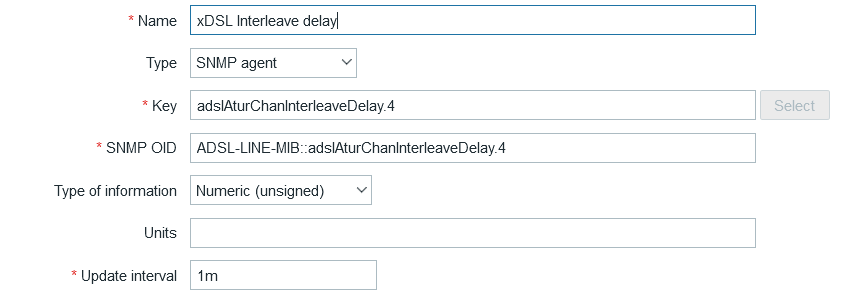
In Zabbix the key must be a unique identifier used to in the database to identify this specific value to be read. The template uses part of the human readable OID, but this can lead to backwards compatibility issues if DrayTek (as it happened already), moves the data among different OIDs. Feel free to use a Key that does not change if the OID referring to the actual value is changed. Here I used the human-readable OID in the SNMP OID field, but numeric ones will work as well. Using human-readable OIDs may require to install the proper MIBs, if not available already, on the system querying SNMP data.
Units in this case should be set to ms (milliseconds). Type of information set to Numeric (unsigned) is correct for the interleave delay, but other data may need different types.
A procedure like this can be followed to read and map OIDs got from the router using other tools than Zabbix, using the snmpwalk raw data as a reference.
A Zabbix template to monitor Vigor 16x devices is available at https://github.com/kmorwath/zabbix-template-draytek-vigor160. It may work with other Vigor VDSL models, but it might not able to return all the available data, or identify all interfaces.